
This is a very important and very intelligent doubt — almost everyone who learns seriously reaches this point.
You’re right to question it, because “don’t take notes while watching” is often misunderstood.
Let me correct it properly, remove confusion, and give you the best practical system for Udemy + coding + AI.
🧠 FIRST: THE CORE CONFUSION (CLEAR THIS)
You’re thinking:
“If I don’t take notes while watching, how do I know the complete content of the video?
What if I miss points during recall?”
This fear is valid, but the solution is NOT rewatching or heavy note-taking.
✅ THE TRUTH (IMPORTANT)
❌ The goal is not to capture 100% of video content
✅ The goal is to capture 100% of what MATTERS
Most Udemy videos contain:
- Core concepts (20–30%)
- Examples
- Repetition
- Extra commentary
Your brain should store structure + meaning, not transcripts.
🧠 THE CORRECT 3-LAYER NOTE SYSTEM (BEST PRACTICE)
You should NOT choose between:
- No notes ❌
- Heavy notes ❌
You should use THREE DIFFERENT LAYERS 👇
🟢 LAYER 1 — LIGHT ANCHOR NOTES (DURING VIDEO)
(Yes, you ARE allowed to write — but very lightly)
✍️ What to write while watching (MAX 5–7 bullets)
- Headings
- Keywords
- Diagrams
- Section titles
❌ No explanations
❌ No full sentences
❌ No copying slides
Example (while watching PySpark Shuffle video):
• shuffle = data movement
• triggered by join / groupBy
• map side → reduce side
• disk + network
• performance issue
📌 This is NOT learning — this is orientation.
Think of it as a table of contents, not notes.
🧠 WHY THIS IS SAFE
- You don’t interrupt understanding
- You don’t overload memory
- You don’t miss the “scope” of the video
🔵 LAYER 2 — ACTIVE RECALL NOTES (AFTER VIDEO) ⭐⭐⭐
This is the MOST IMPORTANT PART.
After video:
- Close everything
- Use your anchor bullets
- Recall & write from memory
✅ MEMORY-OPTIMIZED NOTE FORMAT (BEST)
Use this for every topic:
TOPIC NAME

1. What is it? (1 line)
2. WHY does it exist?
3. HOW does it work? (high level)
4. WHEN should I use it?
5. Trade-offs / limitations
6. Interview traps / mistakes
Example (PySpark Shuffle – after recall):
Spark Shuffle

1. What: Redistribution of data across executors
2. Why: Needed for joins & aggregations
3. How: Map writes → network transfer → reduce reads
4. When: Wide transformations
5. Trade-off: Expensive (disk + network)
6. Trap: Too many partitions cause slowness
📌 If you missed something → that’s GOOD
It tells you what your brain didn’t encode.
🔴 LAYER 3 — VERIFICATION & GAP FILLING (VERY SHORT)
Now you:
- Reopen video
- Scan sections you missed
- Add only missing bullets
❌ Do not rewrite everything
❌ Do not beautify notes
This ensures completeness without passivity.
🧠 SO THE FINAL FLOW IS (SAVE THIS)
Watch video
   ↓
Light anchor bullets (5–7)
   ↓
Close video
   ↓
Recall & write structured notes
   ↓
Verify & fill gaps
This solves ALL your doubts:
✔ You don’t miss content
✔ You don’t rely on memory blindly
✔ You don’t waste time rewatching
🧠 BEST NOTE FORMATS (CHOOSE BASED ON PURPOSE)
You asked for best techniques & formats — here they are.
🟦 FORMAT 1 — INTERVIEW / CONCEPT NOTES (BEST DEFAULT)
Use when learning Python / AI / PySpark concepts.
TOPIC
• Definition
• Mental model
• Why
• How
• When
• Trade-off
• Trap
⭐ Best for:
- Interviews
- Concept clarity
- Long-term recall
🟩 FORMAT 2 — MIND MAP NOTES (FOR BIG PICTURE)


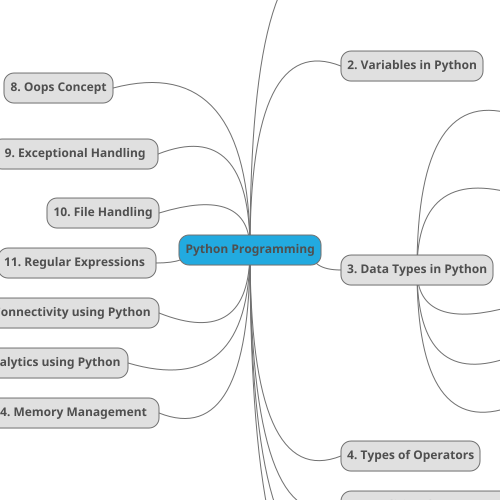

Use mind maps:
- AFTER watching a module
- NOT after every small video
Example (Python Data Types):
Data Types
├── Immutable
│   ├── int
│   ├── float
│   ├── str
│   └── tuple
└── Mutable
    ├── list
    ├── dict
    └── set
📌 Mind maps answer:
“How does everything connect?”
🟨 FORMAT 3 — CODING PATTERN NOTES
Use for DSA / logic.
PATTERN
• Problem signature
• Idea
• Template
• Time/Space
• Mistake
🧠 WHEN TO USE WHICH NOTES
| Situation | Note Type |
|---|---|
| Watching video | Anchor bullets |
| After video | Structured recall notes |
| After module | Mind map |
| Coding practice | Pattern notes |
| Interview prep | Recall + palace |
🧠 IMPORTANT MINDSET SHIFT (THIS MATTERS)
Missing points during recall is NOT failure
It is how the brain decides what to remember
If you remember everything easily → memory is weak
If recall feels effortful → memory is being built
🔥 FINAL RULES (SAVE THESE)
1️⃣ Never transcribe videos
2️⃣ Always recall before verifying
3️⃣ Notes should trigger memory, not replace it
4️⃣ Mind maps are for connections, not details
5️⃣ Completeness comes from verification, not copying
🚀 IF YOU WANT NEXT
I can:
- Convert one Udemy lesson into perfect notes (live example)
- Design a Notion / Markdown note template
- Show how top engineers organize notes
- Create mind map templates for Python / PySpark / AI
Just tell me what you want to try next 👍