
Excellent.
DAY 9 looks simple on the surface — but tuples quietly power hashing, performance, safety, and Python’s core semantics.
Most people underestimate tuples. Interviewers don’t.
🧠 DAY 9 — Tuples: Immutability, Hashing & Performance Tradeoffs
🔑 CORE IDEA OF DAY 9
Tuples exist to provide immutable, hashable, lightweight sequences — not just “lists you can’t modify”.
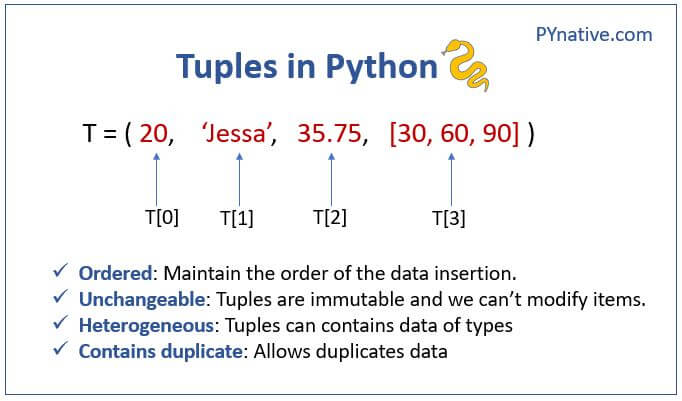
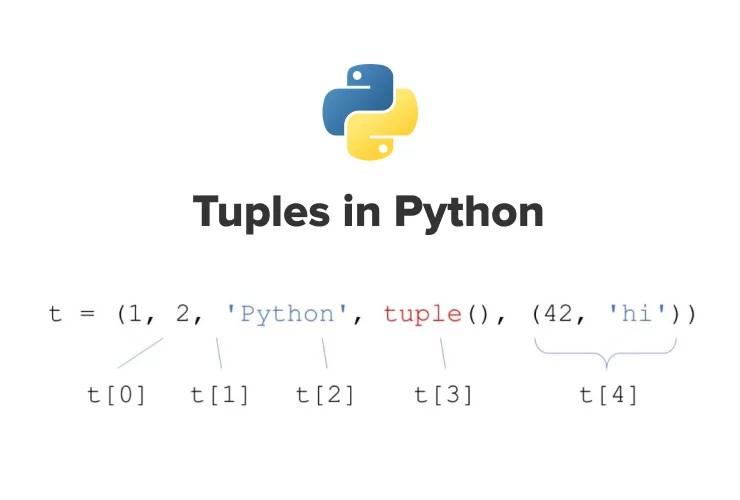
1️⃣ What a Tuple REALLY Is
A tuple is:
- An immutable sequence of object references
- Stored as a fixed-size array
- Smaller and faster than lists
- Hashable if elements are hashable
t = (1, "a", [10])
Important:
- Tuple immutability applies to the tuple structure
- Not to the objects inside it
2️⃣ Tuple Memory Model (Compare with List)


Tuple (conceptual)
tuple
 ├── ob_refcnt
 ├── ob_type
 ├── size (fixed)
 └── array → [ref, ref, ref]
List (contrast)
- Has capacity
- Over-allocates
- Supports resizing
👉 Tuples are simpler and tighter.
3️⃣ Why Tuples Are Faster Than Lists (Often)
Reasons:
- Fixed size → no resizing logic
- Less memory overhead
- Better CPU cache locality
- Optimized iteration
Example:
for x in (1, 2, 3):
    pass
Is slightly faster than:
for x in [1, 2, 3]:
    pass
Not huge — but real.
4️⃣ Tuple Immutability ≠ Deep Immutability (TRAP)
t = ([1, 2], [3, 4])
t[0].append(100)
print(t)
✔ Works
Why?
- Tuple didn’t change
- Inner list mutated
🚨 This breaks many assumptions.
5️⃣ Why Tuples Are Hashable (And Lists Aren’t)
Tuple hashing:
- Combines hashes of elements
- Cached after first computation
- Safe only if elements are immutable
d = {(1, 2): "ok"}
But:
d = {([1, 2], 3): "fail"} # TypeError
Because list is mutable → unstable hash.
6️⃣ Tuples as Dictionary Keys (VERY IMPORTANT)
Use tuples when:
- Composite keys needed
- Coordinates
(x, y) - Multi-column keys
- Group-by operations
index = {}
index[(user_id, date)] = value
This pattern is everywhere in real systems.
7️⃣ Tuple Packing & Unpacking (NOT MAGIC)
a = 1, 2, 3      # packing
x, y, z = a      # unpacking
Internally:
- Tuple object created
- References assigned
Unpacking is:
- Deterministic
- Position-based
- Very fast
8️⃣ Extended Unpacking (Interview Favorite)
a, *b, c = (1, 2, 3, 4, 5)
Result:
a = 1
b = [2, 3, 4]
c = 5
⚠️ b is a list, not a tuple.
9️⃣ Single-Element Tuple Trap
t = (1)
type(t)   # int ❌
Correct:
t = (1,)
Comma defines tuple — not parentheses.
🔟 Tuples in Function Returns (Design Choice)
def f():
    return 1, 2
Why tuple?
- Lightweight
- Immutable
- Structured return
This is idiomatic Python.
11️⃣ Tuples & Interning (Small Optimization)
- Empty tuple
()is a singleton - Small tuples may be reused internally
- Do NOT rely on identity
() is () # True
But don’t depend on this.
🔥 INTERVIEW TRAPS (DAY 9)
Q1
t = ([],)
t[0].append(1)
print(t)
✔ ([1],)
Q2
print((1, 2) + (3, 4))
✔ (1, 2, 3, 4)
(New tuple created)
Q3
print({(1, 2): "a"}[(1, 2)])
✔ "a"
Q4
a = (1, 2, 3)
b = a
a += (4,)

print(b)
✔ (1, 2, 3)
(New tuple, rebinding)
🧠 DAY 9 MENTAL CHECKLIST
Before choosing tuple:
- Do I need immutability?
- Do I need hashing?
- Is size fixed?
- Is this a composite key?
If YES → tuple
If NO → list
📝 DAY 9 ASSIGNMENT (MANDATORY)
1️⃣ Predict output (NO RUNNING):
t = ([1, 2], 3)
u = t
t[0].append(4)

print(t)
print(u)
2️⃣ Explain clearly:
- Why tuples can be dict keys
- Why tuple immutability is shallow
3️⃣ Design question:
Why didn’t Python make lists hashable with runtime checks?
🔜 DAY 10 PREVIEW
DAY 10 — Sets & Frozensets (Hash Tables, Collisions & Math Semantics)
You’ll learn:
- How sets work internally
- Why order is undefined
- Hash collisions
- Why
{1, True, 1.0}has one element
When ready, say 👉 “START DAY 10”