
Excellent.
DAY 6 is where we drop below the language surface and inspect number objects at CPython level.
After today, floating-point bugs, big integers, and numeric interview traps will feel obvious instead of confusing.
🧠 DAY 6 — Integers & Floats (CPython Internal Implementation)
🔑 CORE IDEA OF DAY 6
Python numbers are objects, not CPU primitives.
They trade raw speed for correctness, safety, and flexibility.
1️⃣ Numbers in Python ≠ Numbers in C
In C:
int x = 10; // fixed-size, CPU register
In Python:
x = 10 # object on heap
This single difference explains:
- Arbitrary precision
- Slower arithmetic
- Memory overhead
2️⃣ Python Integer (int) — Arbitrary Precision
What “arbitrary precision” means
Python integers grow as large as memory allows.
x = 10 ** 1000
print(x)
✔ Works
✔ No overflow
✔ No wraparound
3️⃣ CPython Internals of int
In CPython, integers are implemented as variable-length objects.
Conceptually:
PyLongObject
 ├── ob_refcnt
 ├── ob_type
 ├── ob_size     (number of digits)
 └── ob_digit[]  (array of base 2^30 or 2^15 digits)
Important:
- Python stores numbers in base 2ⁿ, not base 10
- Size grows dynamically
This is why:
10 + 1
is much slower than the same operation in C.
4️⃣ Why Python Can’t Overflow Integers
C:
INT_MAX + 1 → undefined / wrap
Python:
(2**63 - 1) + 1
Python allocates more memory instead of overflowing.
✔ Safety
❌ Performance cost
5️⃣ Integer Caching (Small Integer Optimization)
CPython pre-creates and reuses integers in range:
[-5, 256]
a = 100
b = 100
a is b   # True
But:
a = 1000
b = 1000
a is b   # False
⚠️ This is:
- CPython-specific
- An optimization
- Not guaranteed by language spec
Never rely on it.
6️⃣ Boolean Is a Number (Again, but Deeper)
issubclass(bool, int) # True
Internally:
True  == 1
False == 0
But:
True is 1 # False
Because:
- Same value
- Different objects
7️⃣ Python Float (float) — IEEE 754
Python floats are C doubles (64-bit IEEE 754).
Structure:
1 bit   → sign
11 bits → exponent
52 bits → mantissa
This means:
- Limited precision
- Binary fractions
- Rounding errors
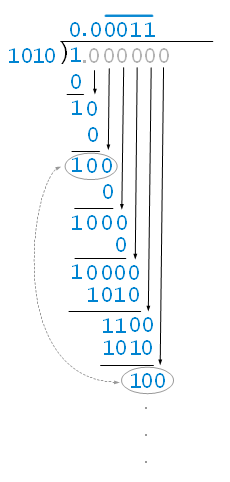
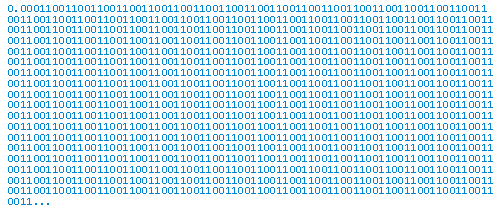
8️⃣ Why 0.1 + 0.2 != 0.3
0.1 + 0.2 == 0.3 # False
Why?
- 0.1 cannot be represented exactly in binary
- Same for 0.2
- Error accumulates
Actual value:
0.1 + 0.2 → 0.30000000000000004
This is NOT a Python bug.
This is math + hardware reality.
9️⃣ Visualizing Float Precision


🔟 Comparing Floats Correctly (INTERVIEW ESSENTIAL)
Never do:
a == b
Instead:
import math
math.isclose(a, b)
Or:
abs(a - b) < 1e-9
11️⃣ Performance Implications
| Operation | Python Cost |
|---|---|
| int addition | O(n) (digits) |
| float addition | O(1) |
| big integer multiplication | O(n²) or better |
This matters in:
- Cryptography
- Data engineering
- Algorithm design
12️⃣ Memory Footprint Comparison
import sys

sys.getsizeof(1)       # ~28 bytes
sys.getsizeof(10**20)  # larger
Even 1 is not 1 byte or 4 bytes — it’s an object.
🔥 INTERVIEW TRAPS (DAY 6)
Q1
print(1.0 == 1)
✔ True
(Value comparison after coercion)
Q2
print(True + True + False)
✔ 2
Q3
print(0.1 * 3 == 0.3)
✔ False
Q4
Why is decimal.Decimal slower but safer?
✔ Arbitrary precision
✔ Base-10 math
❌ More overhead
🧠 DAY 6 MENTAL MODEL
Before numeric operations, ask:
- Is this integer or float?
- Is precision important?
- Is performance critical?
- Can overflow happen?
📝 DAY 6 ASSIGNMENT (DO NOT SKIP)
1️⃣ Predict output (no running):
a = 10**20
b = 10**20
print(a is b)
2️⃣ Explain clearly:
- Why Python integers are slower than C integers
- Why floats cannot represent most decimals exactly
3️⃣ Think like a system designer:
Why would Python choose correctness over speed for numbers?
🔜 DAY 7 PREVIEW
DAY 7 — Strings (Immutability, Interning & Unicode Internals)
You’ll learn:
- Why strings are immutable
- Unicode storage
- String interning
- Why string concatenation can kill performance
When ready, say 👉 “START DAY 7”